

 72 min read
 If your revenue runs through an app built on AngularJS around 2014, you already know the symptoms. Every release takes longer than the last. The few engineers who understand the controllers are expensive or gone. The AI feature leadership wants doesn’t fit the framework. And if a raise or sale is coming, someone will call the front end a risk.
What fixes it is a staged move to a modern framework, with old and new running side by side so the business keeps working throughout. This guide covers AngularJS-to-Angular migration and the React and Vue routes, drawing on three migrations we delivered for hospitality, retail and wellness software products.
TL;DR
- AngularJS security is solvable with a subscription. Extended support such as HeroDevs NES keeps it patched.
- What a subscription can’t buy: shipping speed, hiring, AI features and a clean due-diligence report.
- Moving off AngularJS is a rebuild for every destination, and business logic in the browser has to move into services first.
- Pick Angular, React or Vue by your team’s skills and the hiring market.
- Migrate in stages, old and new side by side, so the business keeps running.
Is AngularJS still safe to run in 2026?
AngularJS reached end of life on December 31, 2021, and has had no official patches since, according to the AngularJS version support status page. It can still run safely if you pay for extended support, which patches vulnerabilities without code changes. Security alone is rarely the reason to migrate.
BuiltWith still counts hundreds of thousands of live AngularJS sites, about 904,000 in its September 2026 snapshot. Many are booking engines, portals and dashboards that still make money.
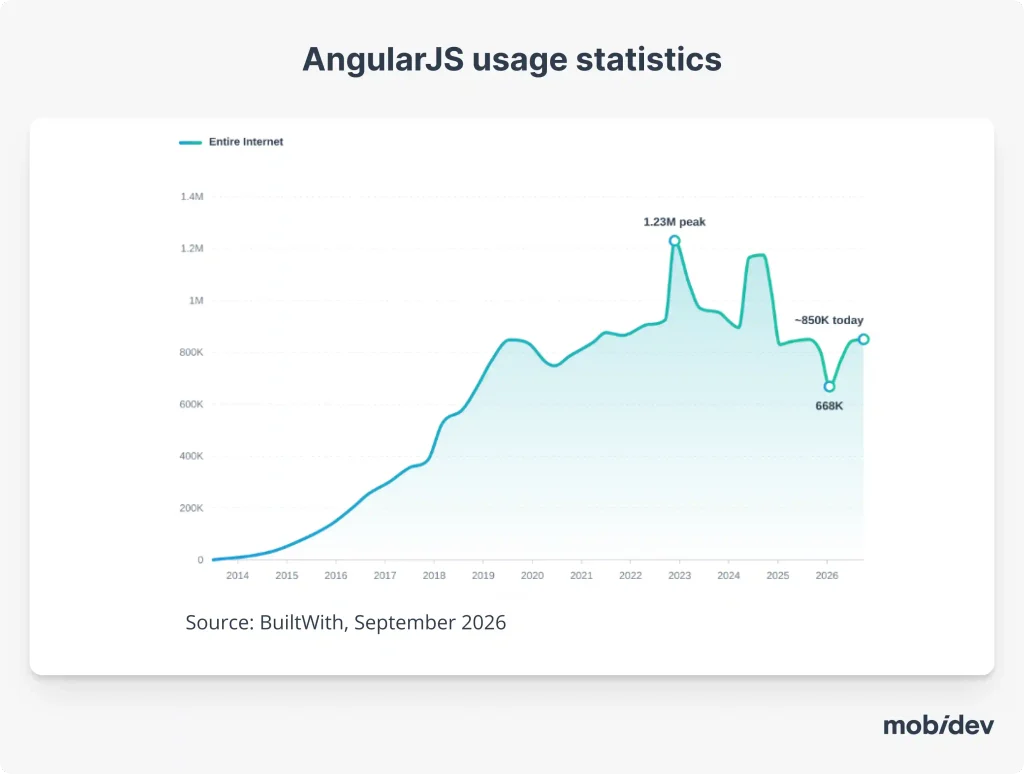
Extended support (HeroDevs NES) vs migration: when NES is enough
HeroDevs NES is enough when the app changes rarely, serves internal users and only needs to stay compliant. It keeps AngularJS patched for SOC 2, PCI DSS, HIPAA and FedRAMP without code changes. Migration fits when the app must ship new features, add AI, attract engineers or pass investor scrutiny.
|
NES fits |
Migration fits |
|
Low-change or frozen app |
Active roadmap with revenue riding on it |
|
Internal users, small audience |
Customer- or partner-facing |
|
Goal is compliance and patching |
Goal is velocity, AI features, hiring |
|
No deal or raise on the horizon |
M&A, PE or funding diligence coming |
What AngularJS really costs you: speed, uptime, hiring, AI, and valuation
The real cost of AngularJS in 2026 is what it stops you doing: shipping quickly, hiring, adding AI features and passing investor review. A patch subscription covers none of them. Clients usually come to us when one of these starts costing real money.
Speed and hiring
At a California home-goods retailer, the developers who understood the inventory-sync logic had left. The only contractor who could still touch it charged nearly twice the market rate. Our audit said the code needed about six months of work just to be safe to extend.
Uptime
That same app ran 45 stores every day. For any COO, the fear is simple: a change that leaves a store unable to sell.
Valuation
A spa and wellness chain learned in growth-round diligence that its AngularJS portal was a major risk, tied to a lower multiple.
Why AI features fight an AngularJS front end
AI features fight AngularJS because LLM responses stream in from outside its digest cycle, so the UI doesn’t update until someone calls $scope.$apply() by hand. Modern AI SDKs are TypeScript-first ES modules, LLM output needs sanitizing on a layer that will never be patched, and coding assistants help less on old patterns.
Here is the problem in miniature:
// AngularJS controller streaming an AI reply
$scope.reply = ”;
const stream = new EventSource(‘/api/concierge/stream’);
stream.onmessage = (event) => {
$scope.reply += event.data; // the model changes…
// …but the view doesn’t: this callback runs outside the digest cycle
$scope.$apply(); // works, but runs a full digest per token, and throws if this
}; // code is ever reached inside a digest ($applyAsync batches)
The same blind spot hits payment widgets and other scripts that change the page outside the framework, and many watchers slow the digest further.
AI SDKs don’t plug into a Bower, Grunt or Browserify build without shimming. And ng-bind-html with $sce is a classic XSS surface, which matters when the HTML you render comes from a model. In our experience, AI coding assistants also help less on $scope-and-controller code.
Adding AI on AngularJS isn’t impossible. It’s slower, more expensive and riskier than on a modern stack.
When investors price it in: AngularJS in due diligence
Investors can price an unsupported front end into the multiple as deal risk. A full migration rarely fits a 2–4-month diligence window. What does fit: an audit, critical security patches, and a milestone-based remediation plan the buyer can price against instead of discounting blind.
The wellness chain had four months to its round. Our audit showed a full modernization would take 7–10 months. So we shipped the critical patches and a staged plan first. The investor repriced, and the deal closed above the multiple on the first term sheet.
If any of this sounds familiar, the next step is sizing the migration. The first surprise for most teams is that there’s no upgrade path, whatever the destination.
What does an AngularJS migration actually involve?
Every AngularJS migration is a rebuild, whether you land on Angular, React or Vue. None of them can run AngularJS code as it is, so the work spans three layers: the UI, the business logic hidden in the browser, and the tooling around both. The second layer usually decides how big the project gets.
The UI
Directives and controllers become components, and two-way binding gives way to one-way data flow with explicit state. This is the part most teams plan for.
The business logic in the browser
AngularJS made it easy to put business rules into controllers and $scope. In our projects, that meant inventory sync for a 45-store retailer, and booking, membership, client profile and waiver logic for a wellness chain. A new front end can’t reuse that code, so it moves into backend services or an API first. That’s why an AngularJS migration reaches the back end.
The tooling
Bower, Grunt and Karma give way to npm, Vite, Jest or Vitest and TypeScript. Other upgrades often ride along, such as an old UI framework or a deprecated test runner.
Integrations
Payments, POS, PMS and scheduling systems each connect through code that has to be found, understood and moved.
To size the work, count how much logic sits in controllers, how many custom directives you have, which integrations touch the front end, how much test coverage exists and how many people still understand the code. For our retail client, the audit showed about six months of work just to make the old code safe to extend. Our real timelines are in the section on duration below.
AngularJS vs Angular: why this is a rebuild, not an upgrade
AngularJS to Angular migration is a rebuild because, despite the name, Angular (2+) is a different framework, with its own rendering model and dependency injection.
|
AngularJS concept |
Modern replacement |
|
The framework itself |
React, Angular (2+) or Vue: a full rewrite |
|
Two-way data binding, $scope, digest cycle |
One-way data flow plus explicit state (Redux, Zustand, Context, NgRx, Signals, Pinia) |
|
Directives / controllers |
Components |
|
Business logic in the client |
Extracted into APIs / services |
|
Bower, Grunt/Gulp, Karma, jQuery helpers |
npm, Webpack/Vite, Jest/Vitest, TypeScript |
|
Bridging during migration |
ngUpgrade (toward Angular), react2angular / single-spa micro-frontends, routing shims |
The fourth row means that pricing, validation, inventory sync and booking rules often live in browser controllers. They have to move behind an API first, which is why an AngularJS migration touches the back end and is bigger than a front-end refresh.
Angular, React, or Vue: where should you migrate?
- Choose Angular if you want opinionated structure and a side-by-side bridge via ngUpgrade.
- Choose React if hiring and ecosystem matter most.
- Choose Vue if your current team needs the shortest learning curve.
|
Factor |
Angular (2+) |
React |
Vue |
|
Team skills |
Suits teams that like structure and TypeScript by default |
Suits teams comfortable assembling their own stack |
Closest syntax and reactivity to AngularJS |
|
Hiring pool |
Solid |
Largest of the three |
Smaller than React |
|
Structure |
Opinionated, batteries included |
Library; you choose routing and state |
Progressive, lighter conventions |
|
Transition effort |
ngUpgrade runs both side by side |
Bridges via react2angular or single-spa |
Fastest ramp-up for the existing team |
|
Ecosystem |
Mature, first-party tooling |
Huge |
Good; some libraries lack TypeScript typings |
If hiring is your bottleneck, an AngularJS to React migration gives you the widest talent pool. If your team reads AngularJS templates fluently, AngularJS to Vue costs the least retraining.
Strangler fig, hybrid (ngUpgrade), or full rewrite?
For a business-critical AngularJS app, the strangler fig pattern is usually safest: new code replaces old code route by route or location by location while both run. A hybrid with ngUpgrade is the Angular-specific version. A full rewrite fits only small apps where a feature freeze and a single cutover are acceptable.
|
Approach |
How it works |
Best for |
|
|
Strangler fig |
Route, screen or location moves to the new app one at a time |
Revenue apps that can’t go dark |
Two systems to run for a while |
|
Hybrid (ngUpgrade) |
AngularJS and Angular run in one app, components upgraded gradually |
Angular destination, large codebase |
Bridge complexity, slower digest |
|
Full rewrite |
Build new app, switch over once |
Small app, low test coverage, hard deadline, freeze acceptable |
Everything lands on cutover day |
Babbel moved its content authoring tool, an AngularJS 1.x app with 80+ custom directives, 35 services and 1,400 unit tests used by about a third of its staff, to React incrementally with zero downtime. Grafana wrote candidly about the failures and wins of moving its template variables from AngularJS to React.
Our retail client switched store by store. The wellness portal moved screen by screen, then location by location.
How to migrate AngularJS without downtime: a 5-step plan
To migrate a business-critical AngularJS app without downtime, audit what must stay true, capture that behavior in tests, extract business logic into services, then rebuild and roll out in bounded stages with old and new running side by side. Build new features, AI included, only on the new codebase.
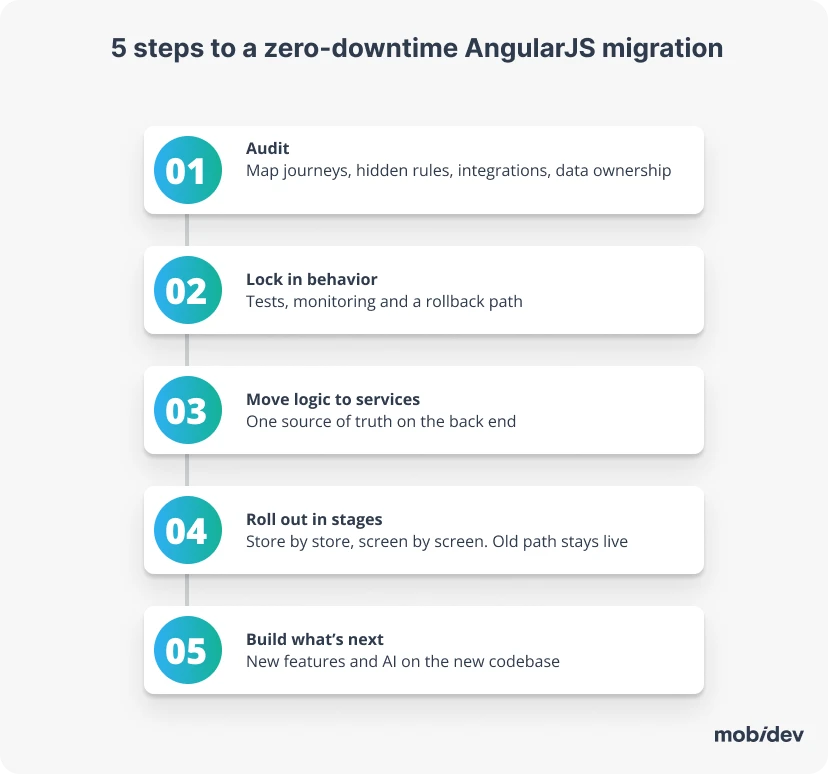
- Audit what must remain true. Critical journeys, hidden business rules, integrations, data ownership.
- Capture critical behavior in tests. Tests that pin down how the app behaves today, plus observability, isolated environments and a rollback path.
- Extract business logic into services or an API. One source of truth, owned by the back end.
- Rebuild and roll out in bounded stages. Per store, location, screen or route. The old path stays live until the new one earns trust.
- Build new features on the new codebase, including AI.
It’s the method from our guide to AI-assisted software modernization. Each of our client cases moved business logic out of the browser first, then rolled out in stages; details in the case studies below.
What AI can automate in an AngularJS migration, and what it can’t
AI can analyze the repository, map dependencies, generate tests, draft component conversions and write documentation. Engineers must own architecture, data ownership, integrations, rollout and UX parity. AI speeds up the volume work; it doesn’t decide what the system must keep doing.
|
AI does well |
Engineers own |
|
Repository analysis |
Architecture |
|
Dependency mapping |
Data ownership |
|
Test generation |
Integrations (POS, PMS, payments) |
|
Component-conversion drafts |
Rollout plan |
|
Documentation |
UX parity |
We give AI agents explicit authority levels: read, propose, execute in a sandbox, and consequential actions that need a human. The flow runs AI agent → constrained execution → independent verification → risk-based human decision → staged production.
Why AI-assisted AngularJS migrations fall behind schedule
HeroDevs reports that 73% of AI-assisted AngularJS migrations fall behind schedule. In our experience they slip when unverified AI output becomes the baseline, when no tests capture existing behavior, and when there are no verification gates. That’s a process problem, not an AI problem.
Our rule: the same agent shouldn’t define a requirement, implement it, and provide the only proof it works.
Our engineers covered this in detail in the webinar AI-Native Speed on a Legacy Codebase. Get you free access to the full recording to better understand why AI guesses on old code and the setup that stops it.
AngularJS migration case studies: Angular, React and Vue
Here are three MobiDev AngularJS migration case studies, one per destination, each started by a business goal AngularJS was blocking.
|
|
Hotel chain case |
Retailer case |
Wellness chain case |
|
Trigger |
AI concierge wouldn’t render |
Knowledge loss, AI forecasting goal |
Due-diligence finding |
|
Destination |
Angular (2+) |
React |
Vue 3 |
|
Approach |
Prototype → audit → rebuild with API layer |
Audit → service layer → store-by-store rollout |
Patches + plan → services → screen-by-screen rebuild |
|
Duration |
~7 monts |
~4-month rebuild |
|
|
Business result |
+22% direct bookings; ~£157K commissions kept |
~30% faster pick times; no store outage |
Deal above first term sheet; 37.7% fewer missed appointments |
|
Technical result |
Bundle size: ~1.8MB → ~950KB (-47%); Load time: ~5.4s → ~2.6s; Build time: ~6 min → ~90s |
Bundle size: ~1.6MB → ~780KB (-51%); Load time: ~4.8s → ~2.1s; Build time: ~5 min → ~70s |
Bundle size: ~2.1MB → ~1.1MB (-48%); Load time: ~6.1s → ~2.9s; Build time: ~8 min → ~2 min |
Case study #1: UK hotel chain: AngularJS to Angular
Migration intent
The website brought about 33% of bookings. Every OTA booking cost 15-18% commission, and repeat guests sat around 30% against a 68% benchmark. The plan: a loyalty program and an AI concierge on their own site.
Blocker
The concierge prototype on the 2014 AngularJS site couldn’t render streamed replies without manual updates.
What we did
End-to-end the modernization project took 7 months, starting with tech audit, then the booking engine and guest portal rebuilt on Angular with an API layer, so business logic left the browser. The loyalty program went into the new booking engine (guest accounts, member benefits at checkout), then the AI concierge shipped natively for guest Q&A and pre-arrival offers like late checkout and spa slots.
Business outcomes
Direct bookings +22% over two quarters, mostly from loyalty. Repeat-guest share from the website hit 71% within a year. About 7,200 room nights a year moved to direct, keeping roughly £157K from OTA commissions.
Migrating a Hotel Booking Engine from AngularJS to Angular

Case study #2: California retailer, 45 stores: AngularJS to React
Migration intent
Add an AI-driven demand forecasting module to compete with two rival chains, especially around holidays.
Blocker
A 2013 inventory and BOPIS app, unstable by 2025, with its sync logic in controllers nobody left on staff understood.
What we did
Audit and roadmap, inventory-sync logic extracted into a service layer, a roughly four-month React rebuild of the associate app and BOPIS flow, then store-by-store rollout with the old system running. The AI demand forecasting module shipped five weeks after launch.
Business outcomes
No store lost its system during the switch. Associates reported about 30% faster pick times. Each of the next three feature requests shipped in weeks; before, each would have taken quarters.
Migrating Retailer’s App from AngularJS to React

Case study #3: US spa and wellness chain: AngularJS to Vue
Migration intent
Close a growth round at the best possible multiple, and open locations without engineering work.
Blocker
A 2012 portal flagged in diligence, with security issues and a manual configuration pass per new location.
What we did
Critical patches and a milestone plan inside the four-month window. Then logic moved to backend services, a configurable POS and scheduling sync layer, a screen-by-screen Vue rebuild with clients booking throughout, AI no-show prediction on previously unused booking history, and location-by-location rollout before AngularJS was decommissioned.
Business outcomes
The deal closed above the first term sheet. A new location is now a configuration task with no development work. Missed appointments fell 37.7%.
How long does AngularJS migration take, and what drives the cost?
A business-critical AngularJS migration typically takes several months. In our projects, the retailer’s React rebuild took about four months after an audit; the wellness chain’s estimate was 7–10 months and delivery took 10, AI features included; the hotel chain’s Angular migration took 7 months.
Cost depends on how much logic lives in controllers and how many integrations you have.
What drives cost and time:
- How much business logic sits in controllers and $scope
- Number of custom directives
- Existing test coverage
- Integrations: POS, PMS, payments, scheduling
- Secondary upgrades that ride along (UI framework, deprecated test runners)
- Knowledge concentration: how many people actually understand the code
An audit turns this list into a number for your app.
5 common AngularJS migration mistakes
The costliest mistakes happen in planning, before any code is written:
- Setting scope and timeline before integrations are mapped. POS, PMS and payment flows hide the real work.
- Freezing the roadmap for a year. Staged rollout lets the business keep shipping.
- Two sources of truth. If old and new apps both write business data without a clear owner, you’ll reconcile by hand.
- A deal or launch deadline shorter than the migration. Ship what fits the window first, as we did for the wellness round.
- Waiting for the next AI tool. Better tools won’t add the tests and verification gates that make AI output safe.
Is your AngularJS app worth migrating? A 2-minute check
Your AngularJS app is worth migrating if people outside IT depend on it and can attach money or a date to it breaking. If it’s an internal tool with no deadline and no sponsor, extended support is the better spend.
|
Budget signals |
No-budget signals |
|
Customer- or partner-facing |
Internal tool used by fewer than ~50 people |
|
Blocks a revenue line or launch |
No external users |
|
On the path of M&A, PE or IPO diligence |
“Good enough” |
|
Tied to a compliance deadline |
No sponsor outside IT |
|
Causing churn or lost deals |
No deadline |
|
Core tool of a revenue team |
– |
Answer the one question:
Who outside IT would notice if this broke tomorrow, and can they put a dollar figure or a date on it?
How to choose an AngularJS migration partner
When comparing AngularJS migration services, check six things: an audit-first offer, case studies for your destination, an incremental rollout plan, AI with verification gates, clear architecture ownership, and references.
- Audit first. No fixed quote before integrations are mapped.
- Destination proof. A case study in your target framework.
- Incremental rollout. Old and new side by side.
- AI with gates. Tests and independent verification.
- Architecture ownership. Named engineers accountable for decisions.
- References. Clients who’ll talk to you.
How MobiDev approaches AngularJS migration
MobiDev has been building and modernizing custom software since 2009. For AngularJS, we start with an audit, turn it into a roadmap, and migrate in stages, the way we moved a 45-store retailer to React store by store, a 12-hotel chain’s booking engine to Angular, and a wellness chain’s portal to Vue screen by screen in 10 months, AI feature included.
We work as an extension of your team, in your repo, with AI-assisted delivery behind verification gates.
If your AngularJS app sits in front of revenue, start with an audit: what must stay true, the logic hiding in your controllers, a destination recommendation, and a staged plan with real timelines.
FAQ
Yes. AngularJS reached end of life on December 31, 2021, and Google no longer releases patches. It still runs on hundreds of thousands of sites, but new libraries, AI SDKs and most developers have moved on. Apps that must keep changing get slower and costlier to maintain each year.
Google’s successor is Angular (2+), a separate TypeScript framework. In practice, teams also replace AngularJS with React or Vue. All three use components and one-way data flow instead of $scope and two-way binding, so any of them means a rebuild.
Not on its own. There have been no official patches since 2021, and $sce/ng-bind-html sanitization is a known weak spot. Extended support such as HeroDevs NES patches vulnerabilities without code changes, which is enough for many low-change apps.
It means rewriting the UI, since there’s no version-to-version upgrade path. The hard part is usually business logic in controllers, which must move into services or an API first. ngUpgrade lets AngularJS and Angular run side by side, so you can migrate gradually instead of all at once.
Yes. Angular’s ngUpgrade module runs both frameworks in one application, so you can upgrade components and routes one at a time. It adds bridge complexity and overhead, so treat it as a temporary state with a planned end.
For some apps, yes. NES keeps AngularJS patched and compliant, which suits internal, low-change or compliance-only apps. It doesn’t speed up feature delivery, widen your hiring pool, make AI features easier, or change how investors view an unsupported front end.
AI can draft component conversions, map dependencies and generate tests, which saves real time. It can’t guarantee the result behaves like the original. Converted code needs behavior-capturing tests, independent verification and human review before production.
Usually the back end needs work. AngularJS apps often keep pricing, validation, inventory sync or booking rules in browser controllers. That logic has to move into backend services or an API, which is why all three MobiDev migrations described above included a service layer.
Investors can treat an unsupported front end as technical risk and lower the multiple. A full migration rarely fits a 2–4-month window, but an audit, critical patches and a milestone-based remediation plan can. For one wellness client, that let the investor reprice, and the deal closed above the first term sheet.
Map critical user journeys, business rules hidden in controllers, integrations (POS, PMS, payments, scheduling), data ownership, test coverage, custom directives and who understands the code. That sets the destination, rollout order and timeline.